Archive for the ‘Experimental’ Category

My Maps Container

Wednesday, August 6th, 2008

When using the Google’s My Maps feature you can display multiple maps at once simply by ticking the boxes, however the ‘Link to this Map’ will only ever include 1 map, so you can’t easily send a group of maps to someone.

… So a new script – this time under the gokml.net banner – for creating a ‘container’ KML that simply opens a bunch of maps at once – this KML is openabe in Google Earth, but also you can share the link so others can see your batch of My Maps at once in Google Maps.

Create a KML container for a group of My Maps


As a total aside I notice My Maps, now sport a (Geo)RSS feed :)

Google Earth: Chart Plotter

Sunday, July 27th, 2008

Did someone mention a chart plotter? If so have a look-see:

Google Earth: Map Plotter

Its hot off the presses so don’t know what options it will need yet, just used three example zooms levels – other options would include the mobile map style. (You can change it by altering the link in Properties)

Also its standard Google Maps, as that is all the API offers. Ideally would be proper flight plan data, but would need a Static Map API to work.

Note: The map is centered on the camera position (so is ideal for the Flight Simulator) – and while it can be used in other modes it wont make much sense. If interest could make one that shows the center of the view itself.

Disclaimer: this is entering the gray area of what is possible with the Static Maps API, so might get pulled, etc.

More flight sim tools

Google Earth: Flight Simulator GPS Arrow

Saturday, July 26th, 2008

Behold a new network link from nearby.org.uk:

Google Earth GPS

Once you have chosen a destination point, a small arrow will be shown in the bottom right of your Google Earth window, which points towards your destination! Ideal for use in the flight simulator, where you can play follow the arrow.

Note it only updates every 5 seconds, and comes with all sorts of disclaimers such as don’t use in life or death situations.

Search along a route

Tuesday, July 22nd, 2008

As a very rough, but somewhat nifty, proof of concept have created a little page, that answers (or attempts to!) the old age question of “Where is the best place to stop off for pizza along my route?”

Search along a route

as mentioned its very approximate, the search alogorithm is crude, I am certain there are better ways of doing it, anyone fancy taking it on?

Geograph by Bittorrent!

Tuesday, July 1st, 2008

Lordelph has just setup a new system to distribute the Geograph archive by bittorrent! For this to work really well we need as many people to help seed as possible, so if you are able please do!

I have a number of servers sitting around that could help with this, so I am particularly keen to have a client that can be setup on linux boxes easy, Lordelph pointed me towards rtorrent which so far seems to be working well. I don’t have time to document it fully now, but below is a quick start guide to what I did to get it going (on Fedora, other flavours very similar), with minimal fuss. The next step will be to have a script to automatically discover new torrents.

#install rtorrent (using yum as fedora)
yum install rtorrent

#create user and folder
adduser geotorr
mkdir /var/geotorr
chown geotorr:geotorr /var/geotorr

#setup initial enviroment
su geotorr
mkdir /var/geotorr/session
mkdir /var/geotorr/watch
cd /var/geotorr/watch/
wget http://torrents.geograph.org.uk/torrents/geograph_vol001_image_0_to_49999.torrent

#create config file (setting up to use created folder, and to setup watch and session folders)
# paste in the example from http://libtorrent.rakshasa.no/browser/trunk/rtorrent/doc/rtorrent.rc?rev=latest and edit
# or see my version available at http://barry.pastebin.com/f6f861f59
nano ~/.rtorrent.rc

#but see also (haven't read it myself!)
# http://kmandla.wordpress.com/2007/05/02/howto-use-rtorrent-like-a-pro/

# then to add new torrents in future just drop the .torrents files in the watch folder
# - a little script that follows that RSS feed would do nicely here!

more… on the geograph forum.

Edited Tues PM for spelling and grammar – the previous post wasn’t proof-read!

Piclens viewer for Geograph

Thursday, June 19th, 2008

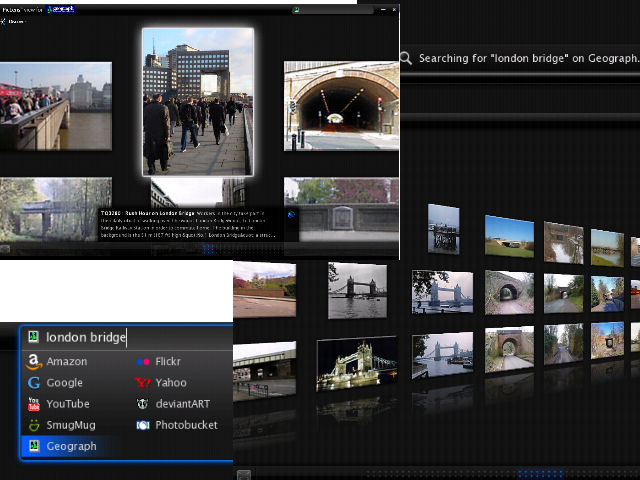
Piclens is an amazing program for very simply viewing photos full screen, in a fluid browser plugin, minimising distractions to focus on the photos. Really you have to try it for yourself to experience it, but below are a few screenshots, I highly recommend downloading it yourself, works on Internet Explorer, Firefox 2 and 3 amongst others. Even more interesting is thanks to the team at Piclens we have a special version that incorperates a Geograph search, so download Piclens using the special link below:

http://download.piclens.com/partner/aT78rK8wv9ML

If you already have it, it might ask to reinstall again.

Piclens screenshots
(click to enlarge – my graphics skills don’t do it justice)

Also of note the search box uses Geograph’s new experimental full text engine, so should be quick and intuitive to use… Also when viewing the search results, continues rightwards in a continuous 3D wall – no paging required.

As expected the piclens display page on Geograph still works, which can be used to visualise any standard results. Choose the ‘piclens’ option using the dropdown on the search page.

Where in the world are people looking? part 2

Saturday, March 1st, 2008

Following part 1 yesterday, have now plotted some maps per individual service.

Flash Earth Layer

Conclusions

  1. Google Earth does request a link for the initial view on startup – that point in the Atlantic.
  2. I guess North American installs have two slightly different default placemarks; has it changed, or maybe Canada gets a different one?
  3. But that doesnt explain the lines from there – people must have their links set to periodically refresh?
  4. Germany likes FlashEarth (or rather people like looking at Germany with FlashEarth link enabled)
  5. Many people leave the links open even when not in use – e.g. the British Isles links show worldwide usage, notably over Russia.
  6. MGRS notably has high usage in two areas.
  7. The Far east likes to know what direction they facing.

Update: In a total forehead slapping momont realised these unprojected whole world images, are exactly what is used in GroundOverlays, so the the pages now include links to view the higher resolution images directly in Google Earth, duh!

Example: View In Google Earth (don’t forget to try adjusting the tranparency slider!) [Update, to fix broken link, sorry!]

Geohash converter; API limit upped

Thursday, February 28th, 2008

Recently geohash.org was released; the premise: short easy links that encode a location. The website offers instant conversion, but as the algorithm is Public Domain, Lordelph was quick to implement a php class, and I could quickly add the conversion to my existing conversion API. Convert a postcode to geohash anyone?

Updating the documentation noticed the API was last updated in 2005 – gulp, how time flies! Anyway as a celebration have upped the throttling on the API, now three times the previous limit. Running on much improved hardware than when it was launched so maybe the limit can be tweaked even more, will run some analysis of its impact – it already seems the API is a minor part of the overall load on the server – particularly against the Google Earth layers.

goKML.net : short (network) links for KML

Wednesday, February 27th, 2008

For a project wanted to create a small script to make generation of network link wrappers to KML content easy, but then I thought could have it create ’short’ urls, ala tinyurl.com, to make reuse easy. But then thought if going to that trouble might as well make it a full blown mini application, so I give you

goKML.net :: Short Links to KML content

I think it turned out pretty well (esp for just an evenings hacking) – it even has an element of ‘design’ – which is saying something!goKML.net : short (network) links for KML

So if you want to create a network link wrapper with the minimum of fuss, and might enjoy having it as a short url, then give it a go.

Of course there are still a few things that could be done, but will leave these for another day…

  • Auto discover the ‘title’
  • Intelligence for ‘My Map’s – eg support multiple pages, and maybe some other KML types.
  • Actually make the admin page useful – display stats (they are stored already) , and edit the link
  • A public gallery of popular/new etc links – maybe even some sort of search – esp if we can do rudimentary indexing of the content (when fetch the title)
  • Support for named links eg could choose gokml.net/fredsparty.kml
  • Complete the support for the various network link options – particulaly making it easier to select the appropriate settings.
  • Maybe even support for forwarding the link by email (and/or sending the admin link to yourself)
  • Any thing you can think of :) – let me know!

(static) Google Maps in Google Earth…

Thursday, February 21st, 2008

Now that Google have just announced a brand spanking new NON JS Maps API, to be able to display maps with a simple img tag, similar to the Chart API. Well I thought it would be fun to re-purpose the
FlashEarth code to create a network link to display Google Maps in a popup balloon on Google Earth. Not totally sure the utility, but sure is fun (until the novelty wears off!)

Open in Google Earth

Hopefully needless to say the map inside the balloon is static and non draggable.

Update to clarify: You get to draw 1,000 maps daily, which is probably plenty, but go over that and the maps will stop working for you.

Update: as alluded to in the official post, you can use the static API to load a quick map, while the rest of the page loads, then at the last minute change it into a dynamic map. A series of demos showing various ways of lazy loading!